
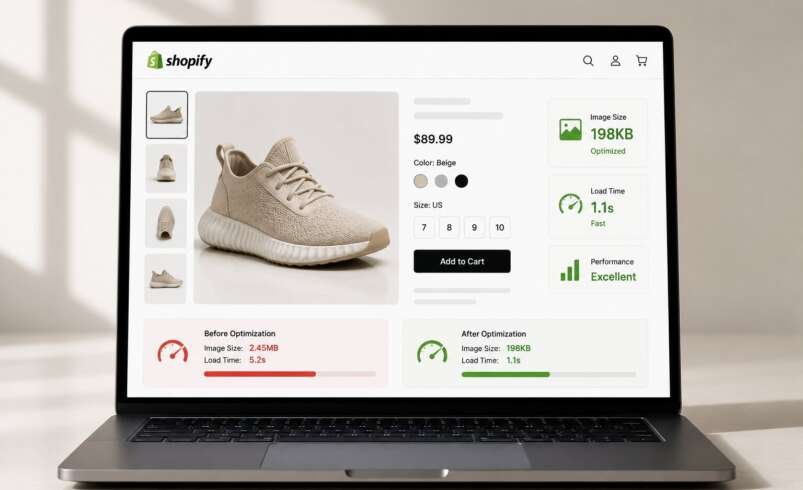

Product photos do two jobs at once: they sell the product, and they load the page. The problem is that most stores treat these as separate concerns, investing heavily in high-quality photography without giving much thought to how those images actually perform on the page. A stunning 5MB JPEG might look great in Lightroom, but inside a Shopify store it becomes a liability.
Shopify product image optimization is the process of making those photos look just as good while taking a fraction of the bandwidth, and it directly affects how fast the store loads, how well it ranks, and how often visitors convert.
Product Images Are Often the Heaviest Thing on the Page
Images account for somewhere between 60-70% of a typical Shopify store’s total page weight. That number explains why slow product pages are so common. A store might have fast hosting, a lightweight theme, and minimal apps and still score poorly on PageSpeed Insights simply because the product images haven’t been touched.
The issue compounds on collection pages, where dozens of images load simultaneously. Each uncompressed photo adds to the cumulative payload, increasing the amount of data the browser needs to download before the page is fully usable. For shoppers on mobile networks, that delay can feel significant.
What Slow Images Actually Cost in Conversions
Page speed has a measurable effect on shopping behavior. According to Google, a one-second delay in mobile load time can reduce conversion rates by up to 20%. For stores doing real volume, it adds up fast.
A slower Largest Contentful Paint (LCP) is one of the most direct consequences of unoptimized product images. LCP measures how long it takes for the largest visible element on the page, usually the hero product photo, to fully render. Google’s Core Web Vitals recommend keeping LCP at or below 2.5 seconds for a good user experience. Stores that consistently miss that mark often struggle with both search visibility and conversions.
What Shopify Product Image Optimization Actually Involves
Optimization is a combination of format selection, file size reduction, proper dimensions, and descriptive metadata, each one playing a role in how efficiently images load and how well they’re understood by search engines.
Format: Switch to WebP
WebP is the right format for Shopify product photos. It delivers meaningfully smaller files than JPEG at comparable visual quality, which translates directly into faster load times. Shopify already serves WebP automatically to supported browsers, but that only goes so far if the original images are oversized or poorly compressed. Starting with bloated source files limits how much the platform can help.
Compression: Reduce File Size Without Losing Detail
Compression is where most of the performance gains come from. The goal is to strip out data the human eye can’t distinguish anyway. A product photo that looks identical at 200KB versus 1.2MB is always the better choice. Lossy compression works well for photography-style product shots, while lossless is better for images with sharp text or graphics.
Dimensions: Match the Image to Its Display Size
Uploading a 4000×4000px image when Shopify is only going to display it at 800×800px is a common and entirely avoidable mistake. The extra pixels translate into extra file size, longer download times, and unnecessary strain on the browser. Shopify recommends 2048×2048px as the ideal product image size, large enough to support zoom, small enough to stay manageable.
Alt Text and File Names: A Frequently Overlooked Layer
Alt text and descriptive file names don’t affect load speed, but they matter for image SEO and accessibility. A file named IMG_4892.jpg tells Google nothing. navy-canvas-sneaker-side-view.jpg tells it quite a bit. Descriptive alt text gives screen readers context and gives search engines another signal about what the page contains.
Lazy Loading: Load Images Only as They’re Needed
Lazy loading is the practice of deferring the loading of below-the-fold images until a user scrolls down to them. On product pages, this means the browser can focus its resources on loading the main product photo first (the one a visitor actually sees) rather than every image on the page simultaneously. Most modern Shopify themes support lazy loading natively through the loading=”lazy” HTML attribute. If a theme doesn’t include it by default, adding it can help reduce the initial page load.
Why Manual Optimization Doesn’t Scale
Optimizing images one by one works fine when a store has twenty products. It breaks down at two hundred, and it’s essentially unmanageable at two thousand. Every new product listing, seasonal photo refresh, or catalog update means more images to process manually, and in practice, it simply doesn’t get done consistently.
A dedicated image compressor handles this automatically by connecting directly to a Shopify store and compressing images in bulk, including existing catalog images without requiring any manual intervention on each file. New images get optimized on upload, and historical images get addressed without having to go back through the entire catalog by hand.
That kind of automation also ensures consistency. Every product image goes through the same optimization process, which means the store maintains uniform performance rather than having a mix of fast and slow pages depending on when the photos were uploaded.
Conclusion
Product photos are central to the Shopify shopping experience, but large, unoptimized image files consistently drag down store performance, affecting rankings, load times, and conversion rates. Shopify product image optimization brings those files down to a size that loads fast without compromising the visual quality that makes the products worth buying.
The format, the compression level, the dimensions, the alt text, each piece matters, and handling all of them consistently at scale is what separates stores that perform well from those that don’t.
FAQs
What is the recommended image size for Shopify product pages?
Shopify recommends 2048×2048px in a 1:1 aspect ratio. This size supports zoom functionality while remaining manageable for performance.
Does Shopify automatically optimize product images?
Shopify applies basic image optimization and serves WebP to supported browsers, but it doesn’t fully address oversized or poorly optimized source images. Manual or tool-based optimization on top of that makes a meaningful difference.
What’s the difference between lossy and lossless compression?
Lossy compression reduces file size by permanently removing some image data typically invisible to the eye. Lossless compression reduces size without removing any data. For product photography, lossy compression at a high quality setting usually offers the best balance.
How often should product images be re-optimized?
Any time new images are added to the store. Automated tools handle this continuously, so there’s no need to run periodic manual audits.
Can optimizing images reduce abandoned carts?
Indirectly, yes. Faster product pages create a smoother browsing experience. Shoppers who don’t have to wait for images to load are less likely to leave before reaching checkout.